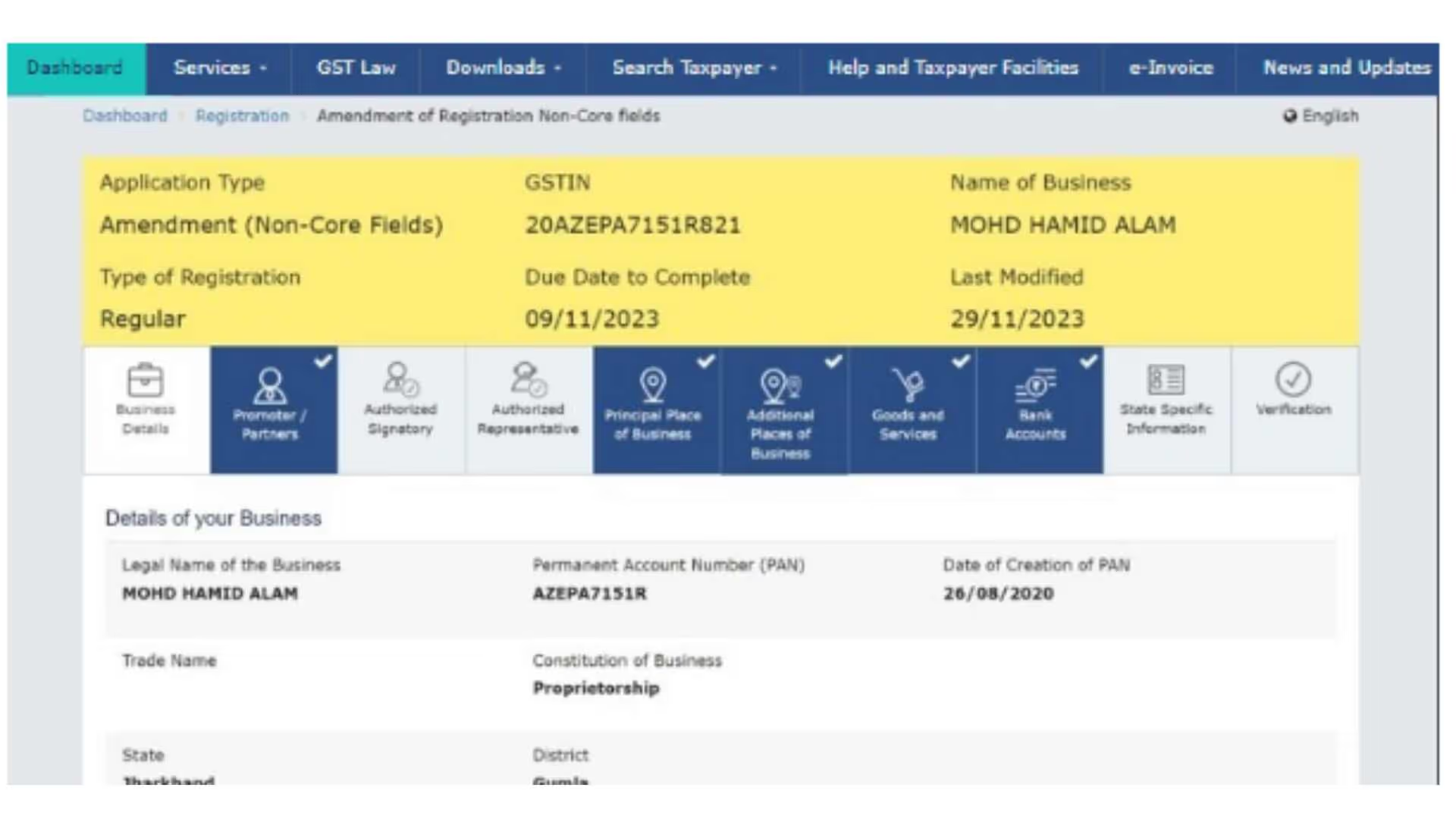
How to Update Email ID and Mobile Number in GST for Proprietorship Under India's Goods and Services Tax (GST) system, business proprietors must register their operations and maintain active data records. Operating under GST requires you to provide the authority with the correct registered phone number and email ID since these will serve as your primary channels for receiving notifications and updates. A proprietor must use the GST portal’s correct steps to modify their email ID and mobile number. This article presents a detailed explanation of “how to change email IDs and mobile numbers in GST registration” for businesses with one owner. Importance of Updating Email ID and Mobile Number in GST The precise maintenance of email ID and mobile number throughout the GST portal stands essential due to multiple reasons:
1. Communication from Tax Authorities: The department of Tax Authorities communicates regularly by using contact details to send updates and compliance reminders to all registered users.
2. OTP-Based Authentication: The authentication process with OTPs uses email and mobile devices for multiple functions, such as modifying return submission details and verifying transactions.
3. Avoiding Compliance Issues: Outdated or wrong contact information will cause your business to miss deadlines and receive penalties because it cannot respond to notices properly.
4. Securing GST Account: Upgrading your registered contact details leads to enhanced protection of your GST account from unauthorized access.
Prerequisites for Updating Email ID and Mobile Number Make sure you have these details prepared before starting the update process:
1. GST Identification Number (GSTIN )
2. Login credentials for the GST portal
3. New email ID and mobile number
4. Access to the registered mobile number/email ID to receive OTPs (if required)
Step-by-Step Guide to Update Email ID and Mobile Number in GST Portal Step 1: Log into the GST Portal 1. You can access the official GST website through the URL https://www.gst.gov.in.
2. Select 'Login' and input your username followed by your password.
3. Complete the CAPTCHA authentication then select ‘Login.’
Step 2: Navigate to the Amendment Section 1. Open the ‘Services’ tab from the dashboard.
2. Click on ‘Registration’ and select ‘Amendment of Registration Core Fields.’
Step 3: Update Contact Details 1. The ‘Authorized Signatory’ tab is located under the amendment section.
2. Choose the authorized signatory account that requires detailed modifications.
3. You need to fill in the new email address and mobile phone number in the provided spaces.
4. Check all entered data for correctness before submitting your request.
Step 4: Verification and Authentication 1. After entering the new details, the system will prompt for OTP verification.
2. OTPs will be sent to both the old and new email IDs and mobile numbers (depending on the change requested).
3. Enter the received OTP to verify the new details.
Step 5: Submitting the Changes 1. Click on ‘Save and Continue.’
2. Using either a Digital Signature Certificate (DSC) (for companies and LLPs) or an Electronic Verification Code (EVC) (for proprietorships and partnerships).
3. You must sign the form within the ‘Verification’ tab.
4. Digital Signature Certificate (DSC) (for companies and LLPs)
5. Electronic Verification Code (EVC) (for proprietorships and partnerships)
6. The changes can be finalized by clicking 'Submit'.
Step 6: Confirmation and Approval 1. Once submitted, you will receive an Application Reference Number (ARN) via email and SMS.
2. The GST authorities will review the request, and upon approval, the updated contact details will be reflected in the GST profile.
3. This process may take 2-7 working days.
Key Considerations While Updating Email ID and Mobile Number 1. Authorized Signatory Approval: Only an authorized signatory can request changes in contact details.
2. Document Verification: In some cases, additional verification or documentation may be required.
3. Regularly Monitor Status: Check the GST portal for status updates on the amendment request.
4. Avoid Frequent Changes: Repeated email ID or mobile number changes may raise compliance concerns.
Common Issues and Troubleshooting OTP Not Received 1. Check spam/junk folders for the email.
2. Ensure the registered mobile number is active.
3. Retry after some time or contact the GST helpdesk.
Unable to Log in 1. Use the ‘Forgot Password’ option.to reset your password
2. Check whether the GST portal is undergoing maintenance.
Application Rejected: 1..Review the rejection reason provided in the GST portal.
2. Reapply with the correct details and necessary documentation.
Conclusion Using new email and phone numbers in your GST proprietorship record ensures you stay in touch with tax requirements. You need to maintain accurate email and phone numbers because GST authorities need them to verify you and send you notices and messages. After logging into the GST portal, users must select the amendment section to update contact information and complete verification using an OTP. After you submit the updates, they normally take effect between 2 and 7 working days. Regular checking and updating GST information helps stop unauthorized users and lets you stay compliant with GST deadlines while avoiding fee penalties. Only an authorized signatory can modify GST information to reduce the risk of unauthorized changes. Proprietors should follow the right rules to keep their GST data correct, which makes running the business easier. Checking business contact details regularly protects monetary value while stopping GST problems from outdated data.
Related read: How to Change Bank Details in GST Portal
FAQs 1. How do I modify my email ID and mobile number when I need to use the GST portal login? The GST portal requires your login credentials to enable any updates.
2. Does it require multiple business working days for updated contact information to appear in the GST system? The entire modification approval process takes two to seven working days.
3. If I lose access to my registered mobile number and email, then what should I do? When unable to reach the GST helpdesk or the GST office, you need to contact them for help with updating your details.
4. What does it cost to modify contact information within the GST framework? Updating your email ID and mobile number through the GST portal can be accessed without any associated cost.
5. What notification procedure exists after completing the contact details submission? The GST portal will provide you with an ARN through email and SMS at the time of submission followed by approval-related confirmation.
People Also Ask 1. How do I update my proprietor name in GST? Proprietor name can be updated in GST by filing an amendment application (Form REG-14) with supporting documents on the GST portal.
2. How to change contact information in principal place of business in GST portal? A. Log in to GST portal → Services → Registration → Amendment of Registration Core Fields → update contact details → submit with DSC/EVC.
3. How to change mobile number and email ID in e-way bill portal? A. Update mobile number/email in GST portal first, and it will auto-update in the e-way bill system.
4. How to reset GST user ID without email? Use the “Forgot Username” option with GSTIN and registered mobile number to reset without email.
5. Can I change my email ID in GST? Yes, email ID can be changed through “Amendment of Registration Non-Core Fields” on GST portal.
6. How many attempts for GST login? The GST portal allows 5 incorrect attempts before the account gets temporarily locked.
.png)
-compressed.jpg)
.jpg)


.png)
.png)
.png)
.png)